Sprite Mesh Baker
A downloadable tool
Sprite Mesh Baker
Bake Sprite3D hierarchies into a single MeshInstance3D ArrayMesh -- right from the Godot editor.
What It Does
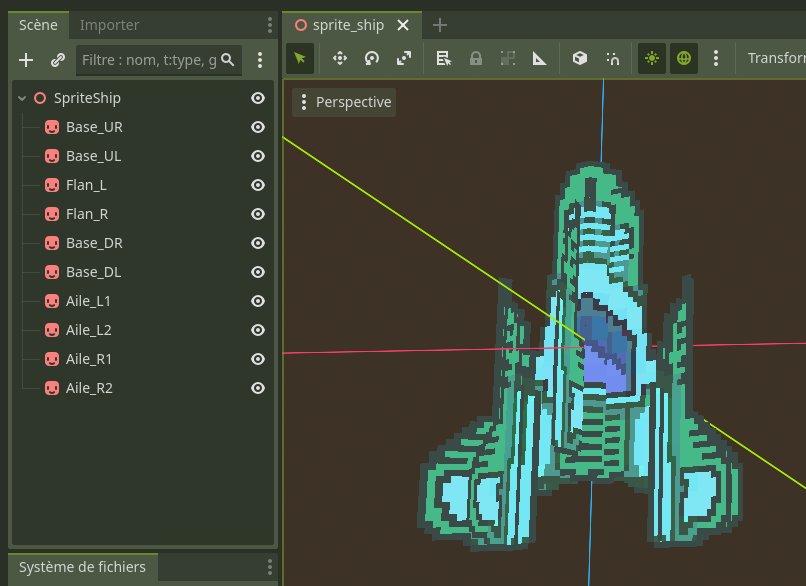
Sprite Mesh Baker is a Godot 4.x editor plugin that takes a tree of Sprite3D nodes under a selected Node3D root and merges them into a single MeshInstance3D with an ArrayMesh. Each sprite is converted into a textured quad, transformed into the root's local space, and combined into as few draw surfaces as possible.
Why Use It
- Fewer draw calls. A ship built from 30 Sprite3D nodes becomes one MeshInstance3D with one surface per texture. The GPU renders it in a fraction of the time.
- Simpler scene trees. Replace dozens of Sprite3D children with a single baked mesh. The node tree stays clean and manageable.
- Non-destructive workflow. The bake operation is fully integrated with the editor's Undo/Redo system. You can also choose to keep, hide, or delete the original sprites after baking.
Features
- Recursively gathers all
Sprite3Ddescendants under a selected root node. - Respects
region_rect,hframes/vframes,frame,flip_h,flip_v,offset,centered,pixel_size,axis, andmodulateproperties. - Groups quads by texture, producing one
ArrayMeshsurface per unique texture (or a single surface when all sprites share the same texture). - Generates unshaded
StandardMaterial3Dwith alpha depth pre-pass, double-sided rendering, and vertex color support. - Configurable texture filtering: Nearest, Linear, Nearest with Mipmaps, Linear with Mipmaps.
- Configurable alpha threshold for transparency.
- Option to hide or delete original Sprite3D nodes after baking.
- Full Undo/Redo support via
EditorUndoRedoManager. - Skips billboard sprites gracefully with a clear warning in the results panel.
Installation
- Copy the
addons/sprite_mesh_baker/folder into your project'saddons/directory. - In the Godot editor, go to Project > Project Settings > Plugins.
- Find Sprite Mesh Baker in the list and set its status to Active.
Usage
- In the 3D scene tree, select the Node3D that serves as the parent of the Sprite3D nodes you want to bake.
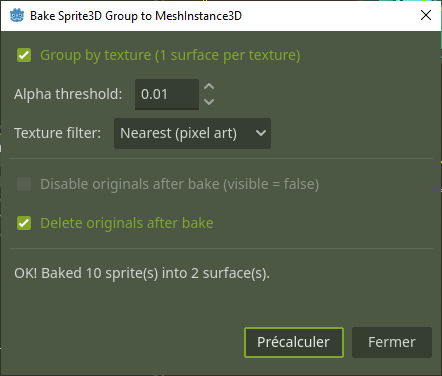
- Open Project > Tools > Bake Sprite3D Group to MeshInstance3D... from the top menu bar.
- The plugin will scan for all
Sprite3Ddescendants under the selected node and report how many were found. - Adjust the bake options as needed (see below).
- Click Bake.
- A new
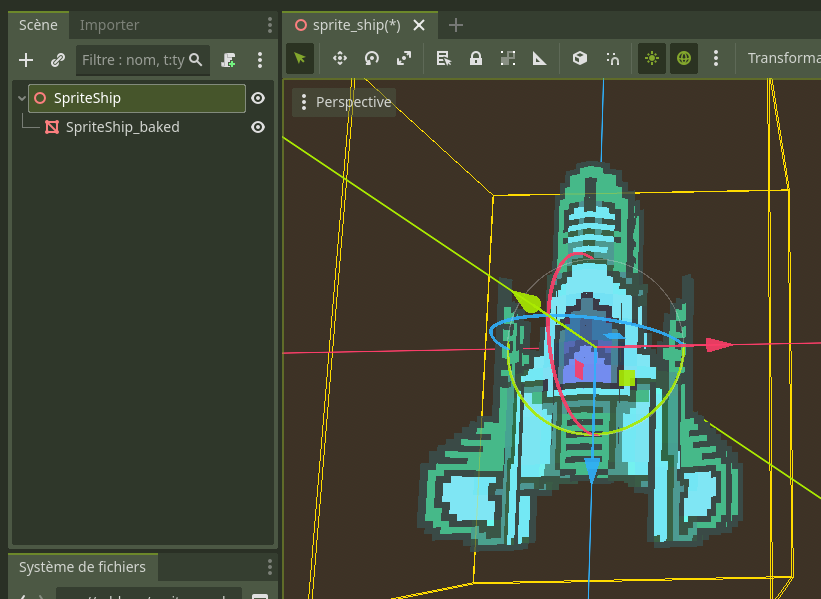
MeshInstance3Dnamed<RootName>_bakedis added as a child of the selected root node.
Options
| Option | Default | Description |
|---|---|---|
| Group by texture | On | Creates one mesh surface per unique texture. When off and all sprites share a single texture, everything goes into one surface. If multiple textures are detected with this option off, the plugin automatically enables it. |
| Texture filter | Nearest (pixel art) | Sets the texture filtering mode on the generated material. Choices: Nearest, Linear, Nearest + Mipmaps, Linear + Mipmaps. |
| Alpha threshold | 0.01 | Controls the alpha cutoff value used by the depth pre-pass transparency mode on the generated material. |
| Disable originals after bake | Off | Sets visible = false on all baked Sprite3D nodes. Undoable.
|
| Delete originals after bake | Off | Removes the original Sprite3D nodes from the scene tree entirely. Undoable. Enabling this option disables the "Disable originals" checkbox. |
Limitations and Notes
- Billboard sprites are skipped by design. Sprites with any billboard mode enabled cannot be meaningfully baked into a static mesh, so they are excluded. The results panel lists all skipped sprites.
- No MultiMesh output. The plugin produces a single
ArrayMesh, not aMultiMesh. This is intentional -- the goal is to merge heterogeneous sprite quads, not to instance identical geometry. region_rectwith zero size falls back to the full texture. If a sprite hasregion_enabledset totruebut itsregion_recthas a width or height of zero, the plugin uses the entire texture dimensions instead.- Sprites without a texture are skipped. Any
Sprite3Dwith anulltexture is silently excluded and reported in the results. - The baked mesh is unshaded. The generated material uses
SHADING_MODE_UNSHADEDwith vertex colors, matching the typical look of Sprite3D nodes. If you need lit materials, you can edit the material on the resulting MeshInstance3D after baking. - Transform fidelity. All sprite positions, rotations, and scales are correctly resolved through the full transform chain into the root node's local space.
Compatibility
- Godot 4.x (tested on Godot 4.5).
- Requires the editor (this is a
@toolEditorPlugin; it does not run at runtime).
License
MIT
Download
Click download now to get access to the following files:
Leave a comment
Log in with itch.io to leave a comment.